
Reminders That Work, Not Just Ping: 8 Automations You Can Run with Clawdi Cron
With Clawdi, cron jobs can do more than ping. They can run work on schedule: gather information, summarize it, and deliver results to your chat, team thread, or webhook.
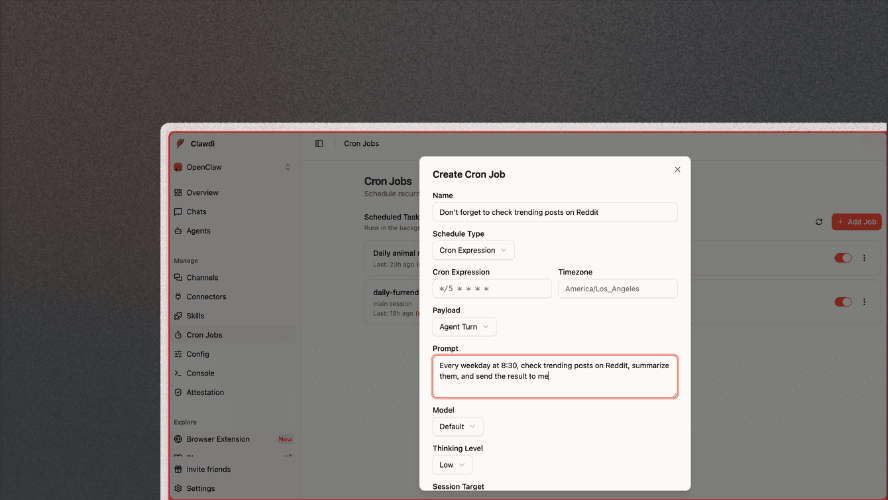
Most reminder tools do one thing: they notify you. That’s useful, but incomplete. And if the reminder still leaves you with 20 minutes of manual work, it’s no longer a reminder; it’s a task handoff.
With Clawdi, cron jobs can do more than ping. They can run work on schedule, such as gathering information, summarizing it, and delivering results to your chat, team thread, or webhook.
Now let's show you 8 practical automations you can run this week.
What Makes Clawdi Cron Different?
A normal reminder says: “Don’t forget to check X.” A Clawdi cron workflow says:
“Every weekday at 8:30, check X, summarize what changed, and send the result to me.” That shift from notification to execution is where teams get real time back.
1) Monday Morning Product + Team Brief
Schedule: Mondays, 8:30 am
What runs:
- Pulls key updates from your docs/issues/channels
- Summarizes top priorities
- Sends a compact “what matters this week” brief
Why it helps: You start with signal, not inbox roulette.
2) Daily “What Changed” Competitor Watch
Schedule: Daily, 9:00 am
What runs:
- Checks selected competitor pages/changelogs
- Detects meaningful updates
- Sends only net-new changes (not noise)
Why it helps: You stop manually re-checking the same tabs every day.
3) Pre-Meeting Context Pack (Auto-generated)
Schedule: 30 minutes before recurring meetings
What runs:
- Pulls last meeting notes + action items
- Surfaces unresolved threads
- Produces a one-screen prep brief
Why it helps: Meetings start with context instead of a recap.
4) Lead Follow-Up Assistant
Schedule: Daily, 4:30 pm
What runs:
- Reviews leads/prospects that need touchpoints
- Drafts concise follow-up suggestions
- Delivers a prioritized list with suggested next action
Why it helps: Pipeline doesn’t stall because “I forgot to follow up.”
5) Founder/Operator End-of-Day Digest
Schedule: Weekdays, 6:30 pm
What runs:
- Pulls important events from the day (tasks, updates, blockers)
- Summarizes wins + unresolved risks
- Sends a structured EOD digest
Why it helps: You get closure and a better handoff to tomorrow.
6) Weekly Content Radar (for marketing teams)
Schedule: Friday, 2:00 pm
What runs:
- Tracks target sources (docs updates, ecosystem releases, community chatter)
- Clusters themes
- Outputs “what to publish next week” recommendations
Why it helps: Editorial planning becomes proactive instead of reactive.
7) Support Escalation Sweep
Schedule: Every 2 hours during the support window
What runs:
- Checks for unresolved, aging, or high-priority support cases
- Summarizes risk and urgency
- Notifies the right channel/person
Why it helps: Critical issues don’t get buried.
8) “If This, Wake Me” Guardrail Alerts
Schedule: Continuous periodic checks (e.g., every 15–30 min)
What runs:
- Monitors key thresholds (service health, response delays, queue growth)
- Sends alert only when the condition is met
- Optional: includes first triage summary
Why it helps: You get fewer alerts, but better ones.
The Pattern That Works
The most effective automations share the same shape:
- Trigger: time-based schedule
- Action: run a real task (not just a ping)
- Delivery: send output where work already happens
- Memory: preserve outcomes so next runs get smarter
That’s how reminders become an operating system.
Where to Start Today
If you’re new to Clawdi cron, start with these three:
- Monday morning brief
- End-of-day digest
- Competitor watch
They’re fast to set up, visible to the whole team, and immediately useful.
Your calendar already knows when work should happen. Clawdi cron adds the missing piece: doing the work at that time. So stop collecting reminders, start shipping outcomes.
Want help setting up your first three automations? Start with Clawdi cron and run your first “execute-notify” workflow this week.
Clawdi is a tool designed to organize your workflow and save you time across the apps you use every day. Now you can use OpenClaw and Hermes on Clawdi.
But don't just take our word for it, listen to the people who are already using it and see how it fits into real workflows.
If you have any feedback or thoughts, send us a message on Twitter/X and LinkedIn. We're all ears. And we'd love to hear how you use Clawdi.