
How to Use AI to Manage Your Gmail Inbox (Step-by-Step Guide)
Learn how to use AI to manage your Gmail inbox, prioritize emails, and draft replies automatically. A simple step-by-step guide.
For many people, Gmail is where the day starts. You open your inbox and see unread messages, long threads, follow-ups you forgot about, and things that need a reply. None of it is difficult. But it takes time. And over time, it adds up. So the question is simple: Can AI help manage your inbox so you don’t have to handle everything manually?
What AI Can Actually Do for Your Inbox
AI assistants are starting to handle some of the most repetitive parts of email. For example, they can summarize long email threads, highlight important messages, draft replies. and extract action items. The goal is not to replace communication, but to reduce the time spent processing it.
Step 1: Start with a Summary
Instead of opening every email, you can start by asking an AI assistant to summarize your inbox. This gives you a quick overview of important messages, context without reading every thread, a way to prioritize your time. Instead of reacting to everything, you begin with a clearer picture.
Step 2: Identify What Actually Needs Attention
Not every email needs a response. An AI assistant can help highlight urgent messages, messages that require action, and messages that can wait. This reduces the mental load of deciding what to do next.
Step 3: Draft Replies Faster
Writing emails is one of the most time-consuming parts of inbox management. AI can help by generating draft replies, summarizing what needs to be said, and suggesting next steps. Even if you edit the draft, it is faster than starting from zero.
Step 4: Keep Track of Follow-Ups
Emails often turn into tasks: follow-ups, reminders, things you said you would do. AI assistants can help track these and surface them when needed. This reduces the chance of things slipping through.
Why Use an AI Assistant Instead of Gmail’s Built-In AI?
Gmail has started to include AI features like summaries and reply suggestions. For many people, those features are helpful. But they are mostly limited to what happens inside your inbox.
An AI assistant like Clawdi goes a step further. Instead of only helping you read and reply to emails, it can connect email with your calendar and other tools, turn messages into actions or tasks, generate summaries that include information from multiple sources, and handle workflows that go beyond a single app.
In other words, Gmail’s AI helps you manage emails. Clawdi helps you manage the work that comes from those emails. For example, an email about a meeting can turn into a scheduled event, a summary, and a follow-up, without switching between tools.
How to Set This Up with Clawdi
If you want to apply this workflow in practice, you can use Clawdi to connect your Gmail and manage your inbox from a single interface.
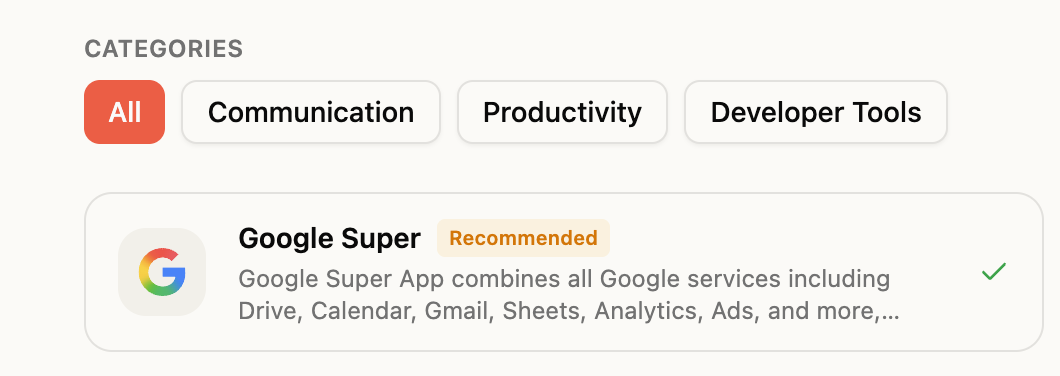
Step 1: Connect your Gmail
Go to https://clawdi.ai/ and set up, and then go to the connectors page:
https://www.clawdi.ai/connectors
Connect your Gmail account and grant the required permissions so Clawdi can access your inbox.
Step 2: Start with a simple command
Once connected, you can ask Clawdi to summarize your inbox, highlight important emails, and draft replies. For example: “Summarize my latest emails and highlight anything urgent.”
Step 3: Use drafts as a starting point
Instead of writing emails from scratch, you can generate drafts and edit them before sending.
Step 4: Turn emails into actions
Clawdi can also help track follow-ups or connect emails with other workflows, so important tasks do not get lost.
What Changes in Practice
The biggest difference is not full automation. It is how you interact with your inbox. Instead of reading everything manually and writing every reply from scratch. You are reviewing summaries, editing drafts, and focusing on what matters. This makes email feel less like a constant interruption.
Where It Still Falls Short
AI is not perfect, which means your drafts may need editing, some context can be incomplete, or important nuance still requires human judgment. But it can reduce the repetitive parts.
Email is one of the most time-consuming parts of modern work. AI assistants are starting to make it easier to manage by reducing the effort required for everyday tasks. Not by replacing your inbox. But by helping you spend less time inside it.
🦞 Try Clawdi today for free → https://clawdi.ai/
🦞 Connect with us → Twitter/X & LinkedIn
🦞 Watch tutorial → https://www.youtube.com/watch?v=tCOEnVV8M9o