
7 Practical Use Cases You Can Run Once Your AI Environment Is Portable
Clawdi 2.0 lets you connect OpenClaw, Hermes, Claude Code, Codex, and more into one portable AI environment. Explore 7 practical use cases you can run from Clawdi Cloud.
Over the weekend, we launched Clawdi 2.0 and reached #2 Product of the Day on Product Hunt. That milestone was exciting, but the bigger signal was this: most people don’t actually have an AI model problem. They have an AI continuity problem.
One assistant works great on a desktop, but forgets context in chat. Another handles one framework well but becomes isolated from the rest of your workflow. You have to reconnect APIs, reexplain goals, and rebuild the setup in too many places.
That’s the hidden tax: not model cost, but setup loss and context fragmentation.
Clawdi 2.0 is built to remove that tax. Your memory, API keys, skills, connected apps, and sessions live in Clawdi, not trapped inside a single runtime. Instead of picking one tool and hoping it does everything, you can connect multiple agents into one environment and run work across them.
1. Connect multiple agent frameworks into one working environment
Most teams and power users don’t use just one AI tool. They use different agents for different jobs. In Clawdi Cloud, you can connect OpenClaw, Hermes, Claude Code, Codex, and more into one environment. That means you’re no longer choosing between tool A or tool B in a hard, permanent way. You can run both, compare both, and route work across both without rebuilding from zero.
The practical win is simple: your environment stays stable while your runtimes evolve.
2. Start a task on the desktop and continue in chat without rebriefing
A common real workflow looks like this: deep work from the desktop, then follow-through from Telegram or WhatsApp while you’re mobile. Without shared context, that handoff is painful. You have to restate goals, paste history, and hope details survive.
With a portable environment, the task continues instead of resetting. You can start on one surface, continue on another, and keep momentum without prompt archaeology.
3. Evaluate agents in the same real context
Most agent comparisons are unfair because the setup differs between tools. When multiple agents connect to one Clawdi environment, you can evaluate them against the same memory, keys, and connected apps. You’re testing actual runtime behavior, not which setup happened to be cleaner. That leads to better decisions and fewer expensive tool-switching mistakes.
4. Run specialist agents without creating isolated memory silos
As workflows mature, people naturally specialize: one agent for research, one for writing, one for operations. The risk is drift; each assistant forms a different version of reality.
With a shared environment layer, specialization stays useful without becoming fragmented. Agents can play different roles while operating from the same context backbone, which reduces contradictions and repeated corrections.
5. Reuse playbooks across agent runtimes
Every serious operator eventually develops repeatable playbooks: launch checklists, research workflows, content QA patterns, and execution routines. In runtime-bound setups, those playbooks are fragile and tool-specific.
In Clawdi 2.0, your operating context is portable, so these playbooks can be reused and improved over time across connected agents. Your process compounds instead of restarting each time a new framework appears.
6. Manage app connections and keys once, then reuse across agents
Repeatedly reconnecting integrations is one of the most frustrating forms of AI setup debt. With Clawdi as the environment layer, your app connections and key management become more durable across your connected agent stack. That reduces duplicated setup work and lowers the chance of breakage during experimentation. It’s one of the highest-leverage productivity gains in real-world usage.
7. Operate from one place as local and cloud usage grow
As usage scales, work spreads across local projects, cloud sessions, and messaging surfaces. Visibility gets fragmented quickly. Clawdi Cloud gives you one place to connect agents and monitor activity as that footprint grows. Instead of constantly asking, “Which tool has the latest context?”, you can focus on what matters: which workflows are active, where handoffs break, and what to improve next.
How to get started in Clawdi 2.0
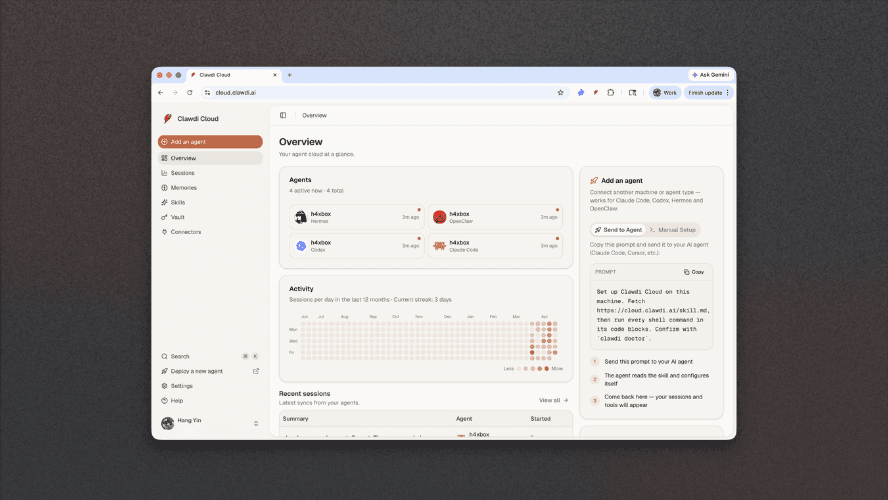
Go to cloud.clawdi.ai. In Clawdi Cloud, go to Add an agent and connect the agent runtimes you already use.
You’ll get a setup prompt, send it to your AI agent, let it configure, then return to Clawdi Cloud. Your sessions and tools will begin appearing in one environment.
If you only do one test today, do this: start a task on the desktop, continue it in chat, and confirm that context carries over without re-briefing. That’s the fastest way to feel the Clawdi 2.0 difference.
When your environment is portable, memory, integrations, and workflows carry forward, even as runtimes change. That’s how AI operations become durable instead of constantly being rebuilt.
If you have any feedback or thoughts, send us a message on Twitter/X and LinkedIn. We're all ears. And we'd love to hear how you use Clawdi.